What happened?
Dashboard
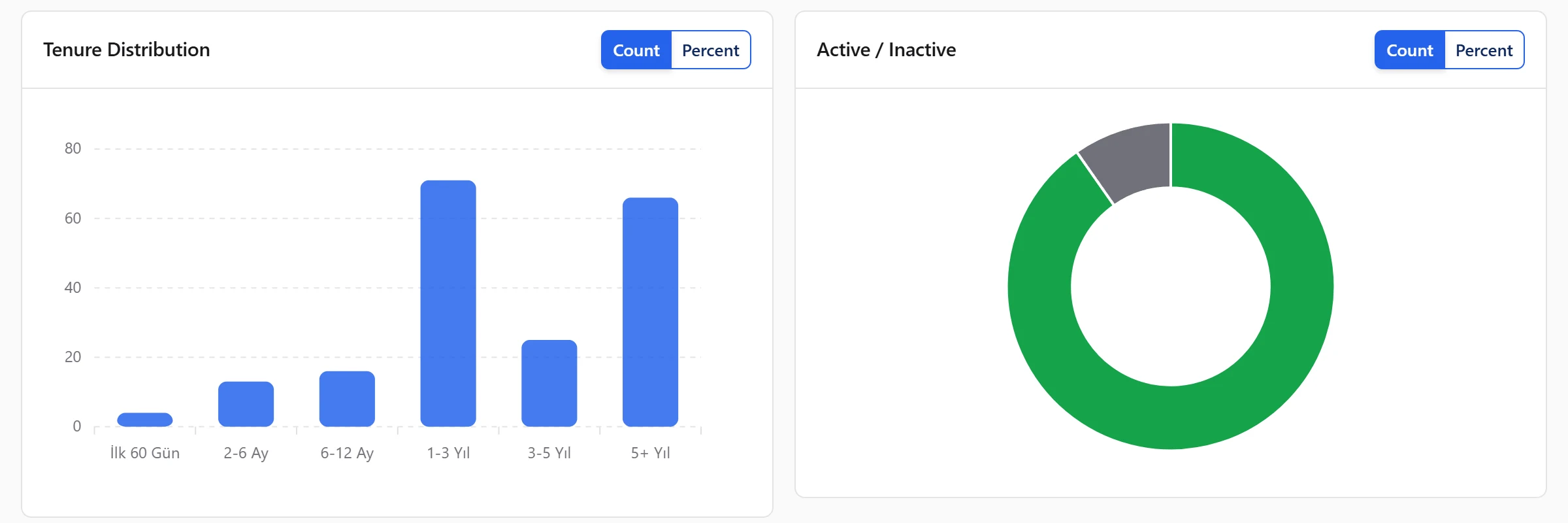
Headcount, turnover, absence rate and open positions on a single screen. Hiring trends, tenure distribution and the ratio of active to inactive employees are calculated from the uploaded file.
Sample data

HR analytics, decision support
Turn workforce data into management decisions.
Upload the Excel, CSV or ODS files you already have. HR Analitic 360 organizes the data around four questions: what happened, where, who is affected and what to do next.

HR data usually sits in scattered spreadsheets. Upload the Excel, CSV or ODS files you already use, and HR Analitic 360 arranges that data in order: what has happened, where the problem is and who it affects, and finally what action to take.
Dashboard
Headcount, turnover, absence rate and open positions on a single screen. Hiring trends, tenure distribution and the ratio of active to inactive employees are calculated from the uploaded file.
Alerts
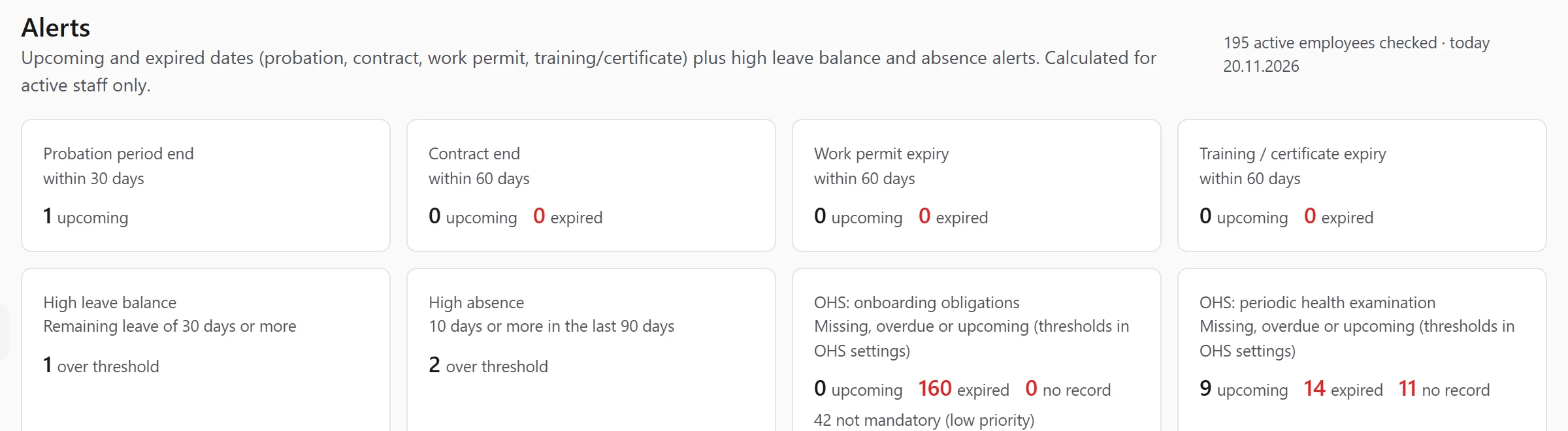
The system checks probation end dates, contract and work permit dates, training and certificate validity, high leave balances and high absence. Every case that crosses its threshold gets its own counter.
Alert list
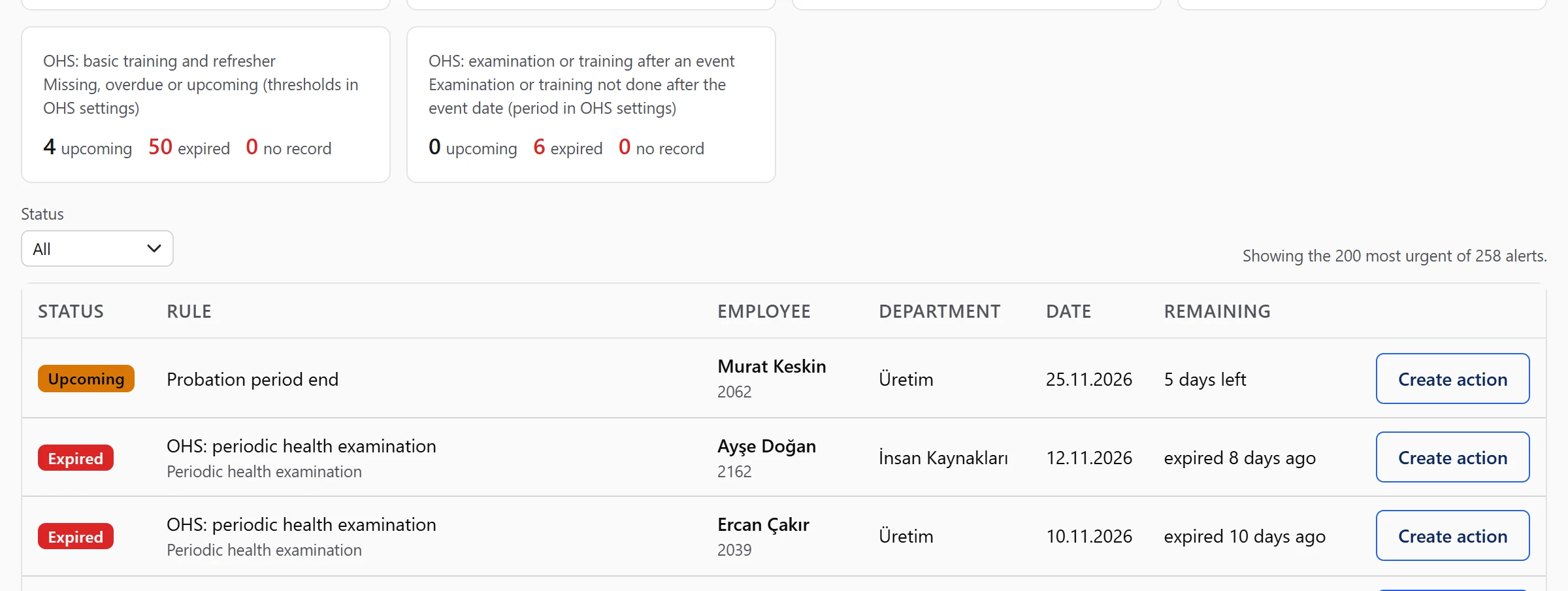
Each alert is listed with the employee, department, date and days remaining. A general rate becomes a concrete record that someone can take responsibility for.
Action Center
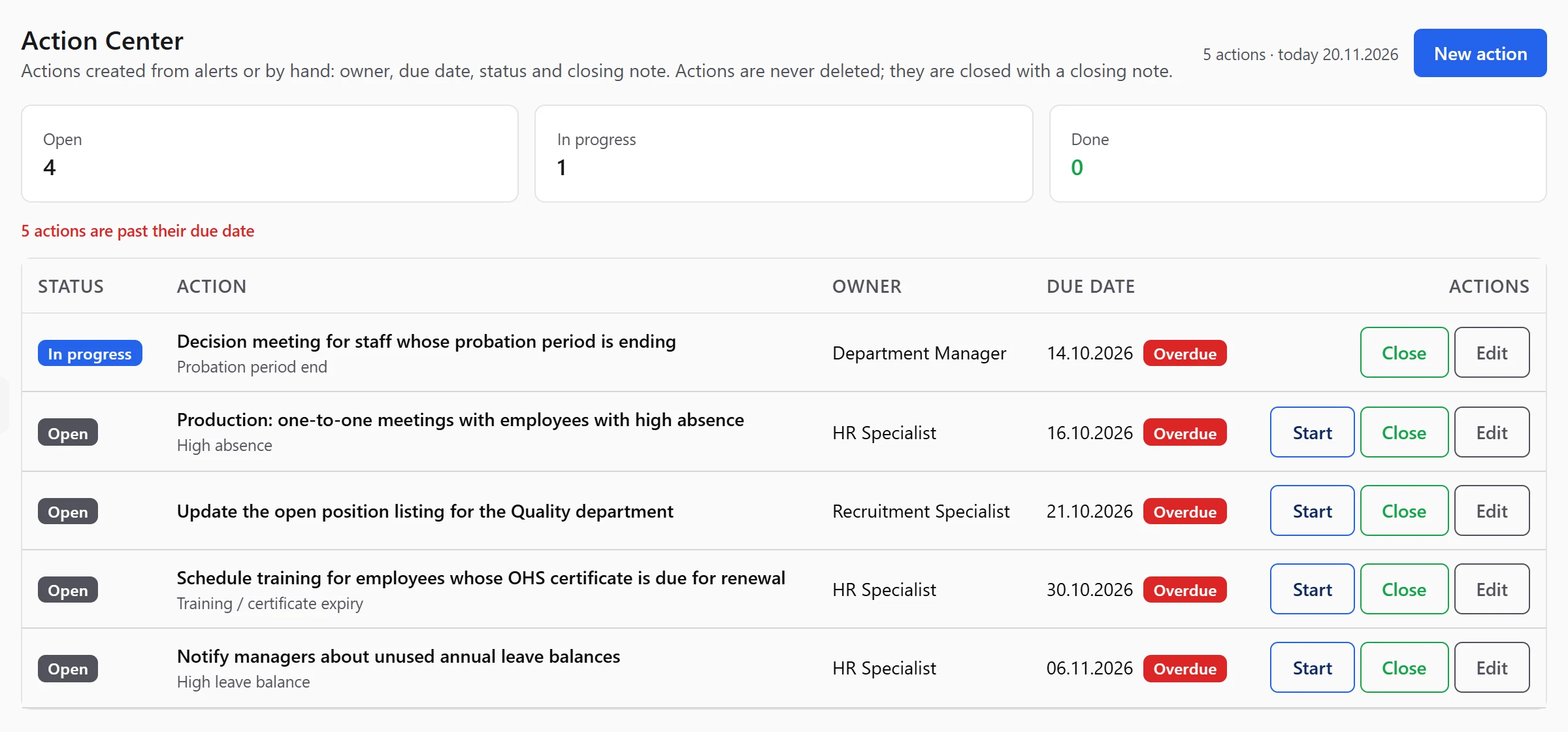
Alerts become action records with an owner, a due date and a status. Records are never deleted; they are closed with a note, so every decision stays traceable.
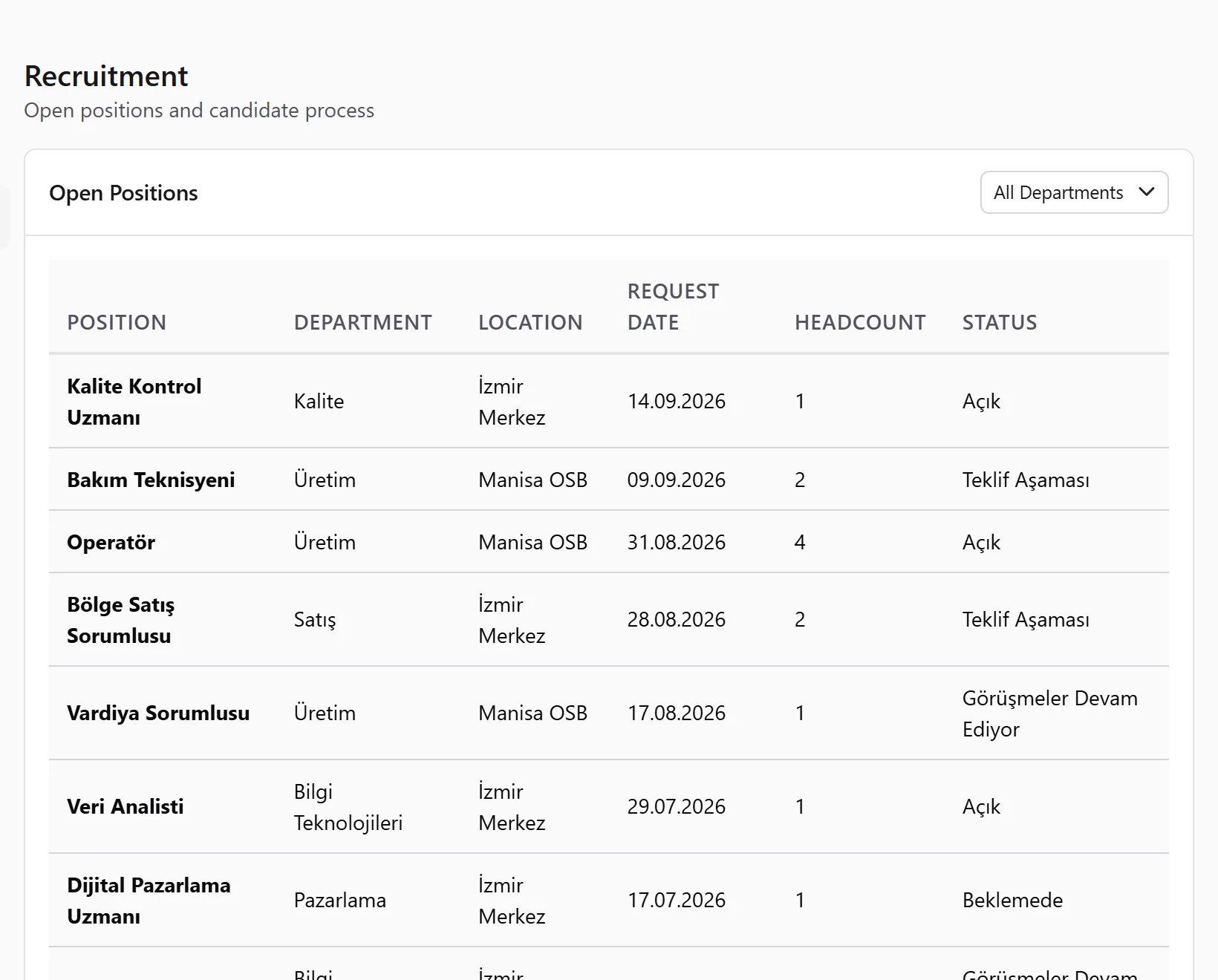
Track open positions, request dates and statuses, along with candidate conversion rates by source.
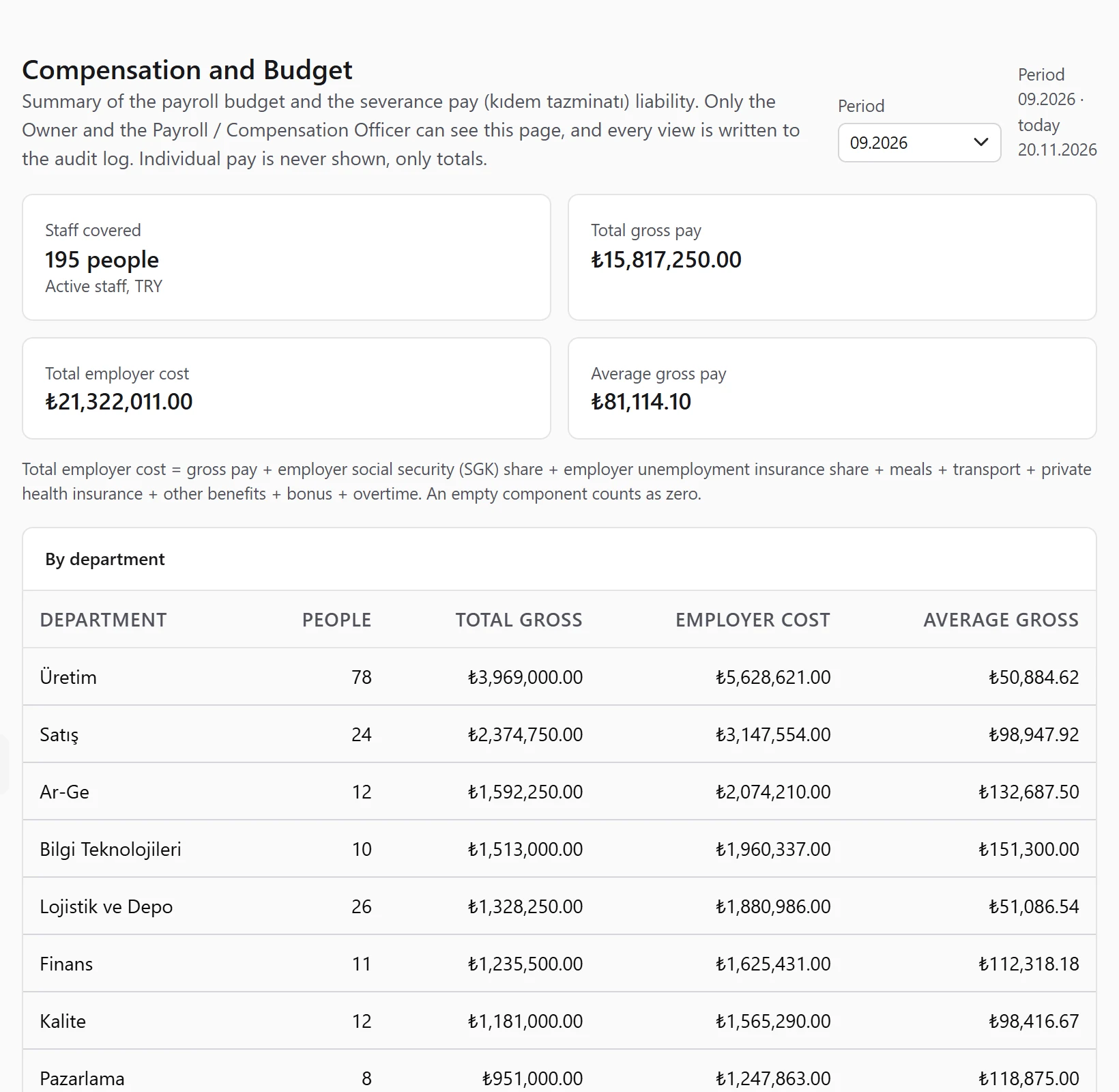
Reports total gross pay, employer cost and a breakdown by department. Severance liability (kıdem tazminatı) is calculated against a ceiling you enter; the system never assumes this value on its own. Access is limited to authorized roles.
Leave and absence, performance, onboarding, training and wage garnishment tracking all work from the same dataset.
Upload your personnel file in Excel, CSV or ODS format. Column names don’t need to match the product template exactly.
Unrecognized columns are mapped once. The mapping is saved and applied automatically to every later upload.
Indicators, alerts and an action list are generated. Missing data is never estimated; the field shows “Insufficient data” instead.
Data integrity. No unreadable value is silently dropped; each one is listed in the upload report. Data is saved in a single transaction, so if anything fails, your existing data stays exactly as it was.
Salary, garnishment and identity details are some of the most sensitive data an organization holds. That is why security is part of the product’s foundation, not a setting added later.
There are two plans. Pricing depends on the number of employees and users, and we prepare a quote specific to your organization.
For a single HR specialist and small teams.
For organizations that need access control and auditing.
Recommended for HR, payroll and management teams working with sensitive data.
Request an Enterprise quotePrices are not published yet. A quote request is non-binding.
Excel (.xlsx, .xls), CSV and ODS. Column names can differ from the product template; unrecognized columns are linked once on the mapping screen and remembered for later uploads.
No. Data is saved in a single transaction, so if an error occurs, your organization’s existing data stays unchanged. Unreadable or invalid values are never silently dropped; they are listed in the upload report.
Data is stored in the European Union, in a data center in Ireland. The database enforces row-level access control, so each organization can access only its own records.
There are five roles: Owner, HR Specialist, Payroll, Training and Summary. Sensitive data such as salary and garnishments is shown to authorized roles only. Every view and change is written to the audit log.
The screen shows “Insufficient data”. Missing values are not estimated or counted as zero, and any records left out are noted on screen.
No. The severance liability (kıdem tazminatı) on the Pay and Budget screen is a potential upper limit, calculated against the ceiling you enter; the actual payment depends on the reason for leaving. For an exact figure, please consult your financial advisor.
Fill in the quote request form below and we’ll get back to you. Existing customers can use the “Log in” link at the top right.
Tell us about your organization’s size and needs, and we’ll get back to you shortly. A quote request is non-binding.